Octabass
Octabass
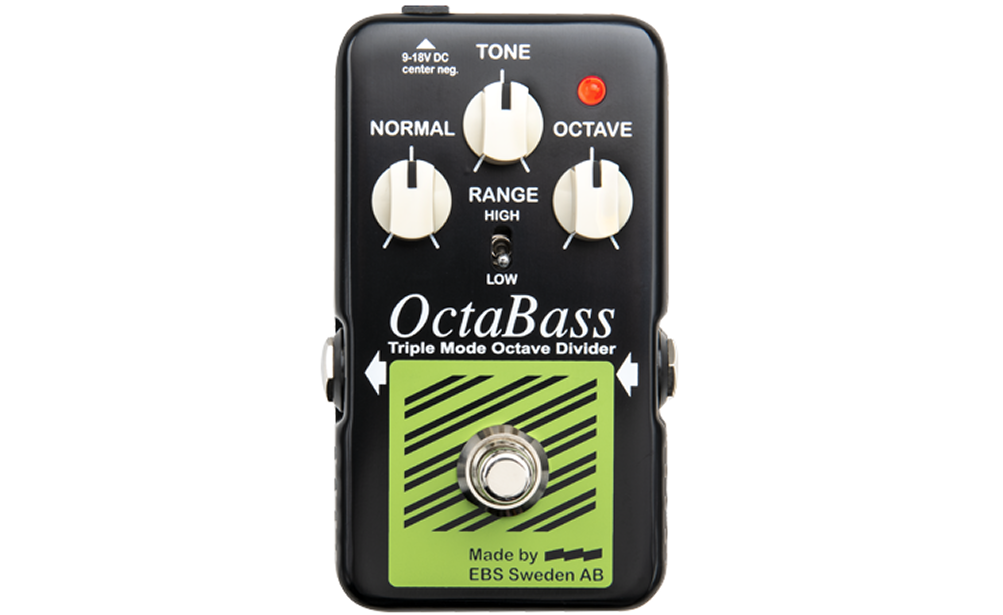
The EBS OctaBass Blue Label. Analog octave perfection—now faster, tighter, and more versatile than ever.
The OctaBass was EBS’s first-ever pedal, known for its fast, fat, and natural octave tracking. The Blue Label version builds on that legacy with extended tracking range, tighter tone control, and a compact, modern design.
Key Upgrades:
New Range Switch – Adjust tracking focus higher or lower on the fretboard to better match your playing style.
Expanded Tone Control – Shape your octave from clean and punchy to deep and subby for more of a synth-style bass tone.
Pedalboard-Ready – 12% smaller footprint, 9–18V DC operation, and recessed jacks.
Playing Tip:
For improved tracking, play clean, single notes close to the neck with your fingers or use muted picking. Use a softer touch, if needed. Avoid chords or loose string noise for optimal response. If using a Jazz bass, roll off the bridge pickup to avoid overtones that may trigger the octave response. If using several pedals, make sure the OctaBass get as clean input as possible, and place and drive pedals or filters after the OctaBass.
Features
Low Range
Preserve the low range
Usage
Suitable for live and studio use
Fretboard Tracking Range
High or Low-optimized fretboard tracking-range
Volume Controls
Controls for Normal and Octave volume
Tone Control
Seamless Tone control for Octave
Power
Can be powered with 9-18V DC
Specs
Nominal Input Level
-10 dBv
Input Impedance
1.8 Mohms
Output Impedance
100 ohms
Dry Bandwidth +0/-2 dB
20 – 20k Hz
Dry Level min/max
-∞ / 0 dB
Octaver Level Gain min/max
-∞ / 12 dB min
Octaver Tone Filter
Type Low Pass, Slope >18 dB/octave, Range 60 – 350 Hz
Triggering Threshold
-70 dBv @ 200 Hz
Dimensions (W x H x D)
2.6″ x 4.5″
Showcase
Questions & Answers
What does the OctaBass actually do?
It creates an analog note one octave below the note you play and lets you blend that lower octave into your original bass signal.
Why doesn't an analog octave pedal like chords?
The tracking circuit needs to identify a clear fundamental pitch. Chords, open-string noise, and overlapping notes present multiple frequencies to interpret at once, which can cause unstable tracking. So, when using an analog octave pedal, be careful to play one note at a time and adapt your style to improve triggering.
How can I get the best tracking?
Use clean single notes, keep unused strings muted, and try a controlled fingerstyle or picking attack. Playing closer to the neck can help because the fundamental note is stronger there.
On a Jazz-type bass, try turning down the bridge pickup and favouring the neck pickup. This can help the OctaBass track more consistently too.
However, even with perfect technique, and following all recommendations, most analog octave pedals still has some spots on the fretboard where they glitches (loose the octave), if you need to play those notes, learn where the glitch happens, and play those notes on a different string and position when needed.
Stable tracking below the G on an E string is rare for analog pedals, and although the OctaBass triggers notes lower than that, depending on the instrument, it is worth being aware of that this is not a fault, but the nature of these effects.
What does the Range switch do?
It moves the area where the tracking circuit is optimized. Choose the lower range if you’re mainly playing lower notes, or the higher setting if you want the octave to follow playing further up the fretboard.
What does the Tone control affect?
Tone shapes the generated octave sound, letting you move from a clearer, tighter octave to a deeper, more sub-heavy character that can approach synth-bass territory.
Why does my Jazz Bass sometimes track better with one pickup?
Two pickups can produce complex harmonic content and partial phase cancellation. If tracking becomes uncertain, try reducing the bridge pickup and using more of the neck pickup to give the OctaBass a stronger fundamental note.
Where should I put the OctaBass in my pedal chain?
A good rule of thumb is to start as early as possible, when the note information is cleanest. Heavy distortion or modulation before an octave pedal can make pitch detection more difficult. Sometimes, a compressor before the octave pedal can help shave off harmonics that may trigger the wrong notes, but that is one of the few exceptions.
Can I use 18 V power with the OctaBass Blue Label?
Yes. The Blue Label OctaBass can be powered by 9–18 V DC, giving it flexible pedalboard compatibility. Previous versions of the pedal should not be powered with 18 V DC.
Will it track the lowest notes on a 5-string bass?
Analog octave tracking becomes more demanding as you go very low. The Range switch extends the useful tracking area, but playing technique and a strong fundamental remain important. Experiment with the range setting and clean, well-muted notes, but in general, analog octave pedals, like the OctaBass, do not offer stable tracking below the G on the low E string, with some variation due to the instrument and playing technique.
Can I get a synth-like bass sound from the OctaBass Blue Label?
Yes. Turn up the octave signal and shape it with Tone for a sythier sub character. Pair it with an envelope filter, such as the EBS BassIQ or drive pedal to push the sound even further into synth territory.
The footswitch on my OctaBass Blue Label seems dead. What should I do?
If your pedal is still under warranty, you should contact EBS Support before doing anything else. If not, proceed and follow the instructions below.
The footswitch on EBS Blue Label pedals features a unique two-part design built to last a lifetime. The switch consists of two separate parts: the switching mechanism attached to the top cover and a relay circuit on the circuit board that is triggered by a magnet when the footswitch is engaged. The two parts are completely separate since the action is triggered by a magnet and not by physical contact, which puts minimal stress on the mechanism and should make it last longer. If the switch appears dead, it is almost 100% because the magnet that should trigger the response has fallen out of place.
The good news is that it almost certainly is something you can fix yourself, and it does not require any soldering.
Here’s a step-by-step instruction:
- Check the footswitch. Disconnect the power supply and remove any battery, then remove the pedal’s bottom cover. Look at the inside end of the footswitch mechanism attached to the chassis. Is there an empty hole in its center? If so, continue and dismantle the pedal by removing the nuts for the input and output jacks, the three knob caps on the front, and then the nuts holding the pots to the chassis, before carefully pulling out the circuit board from the chassis.
- Find the missing magnetic pin. Look inside the enclosure and on the circuit board for a small metal pin, approximately 5 mm long. It is likely attached to another metal part by magnetism. Once located, move to the next step.
- Check the pin’s orientation. Place the open pedal on a clean, non-conductive surface. Connect the correct 9 V DC power supply for the pedal. Carefully bring one end of the pin close to—but not touching—the small component inside the outlined rectangle marked on the circuit board. The LED should switch on or off. Move the pin away and repeat with the other end. Note which end reliably triggers the switch: this end must face the circuit board when the pin is reinstalled. Avoid touching the powered circuit with the pin or any tools.
- Refit the pin. Disconnect the power supply. Apply a small drop of glue to the opposite end of the pin—the end that will go into the footswitch. Insert that end into the empty hole, leaving the end identified in Step 3 facing out towards the circuit board. Keep glue away from the moving parts of the switch.
- Reassemble and test. Let the glue fully cure according to its instructions, then refit the bottom cover. Reconnect power and check that the footswitch operates correctly.
If the pedal still does not work, or if you could not relocate the pin, contact EBS Support, even if the pedal is out of warranty, for further advice.
Octabass Artists